A student's guide
Using AI Tools
How to use AI assistants such as Claude and ChatGPT, and Google Scholar Labs, in your literature search: to sharpen your search, find and check papers, and keep up with new research, responsibly.
AI suggests, you check: let AI speed up your search, then check every paper and every reference yourself.
1
AI Suggests, You Check
Used well, AI assistants such as Claude and ChatGPT can make your search faster and more thorough. They can help you sharpen your question and search words, find papers through research add-ons, explore a topic, check your references and keep up with new work. This guide shows how, with Claude, ChatGPT and Google Scholar Labs.
The rule for all of it: AI suggests, you check.
Can help with
- brainstorming search terms and alternative terminology
- narrowing or sharpening a research question
- finding a first set of papers on a new topic
- checking that references are real, and not retracted
- organising reading notes, and comparing concepts across publications you have verified
- improving the clarity of your writing
Limitations and risks
- AI-generated citations may be fabricated.
- Summaries may leave out important qualifications.
- AI tools may misrepresent theoretical arguments.
- Search results may be incomplete or biased.
- You remain responsible for reading and interpreting the original research.
Keep your main, documented search in Scopus or Web of Science (Journal Basket writes it for you), and use AI around it. AI tools cannot limit a search to the ABDC-rated journals of your discipline, you cannot fully see how they choose papers, and the same question can give different results on another day, so a search with them cannot be repeated or reported exactly.
2
Sharpen Your Question and Search Words
This is where AI helps most, and its suggestions are easy to test. Describe your topic and ask for help with the words you search with. For example:
- "My research question is: … List its main concepts, and for each one suggest synonyms, related terms and British and American spellings, grouped so that I can join them with OR."
- "Turn these concepts into a Scopus search: AND between the concepts, OR within them, quotation marks for phrases and * for word endings."
- "Is this question too broad for a literature review in management? Suggest two narrower versions, and say what each would leave out."
- "Which of these search words are likely to bring in many irrelevant results, and why?"
Journal Basket can write such a request for you, with your discipline, journals and search words already in it: on the Write-up page, choose Improve my search words and click Copy for AI assistant.
Then test the suggestions: run the new search in Scopus or Web of Science and look through the first 20 or so results. Keep the words that bring in relevant papers, drop the rest, and note what you changed and why, for your methods.
3
Find Papers with Research Add-ons: Connectors and Plugins
Claude calls these add-ons connectors; ChatGPT calls them plugins. Each one links the assistant to a research service, so that it can search that service and cite the papers it finds. Some are free; others need your own account with the service, or a paid Claude or ChatGPT plan. Your questions go to the AI company and to the service you connect, so do not include unpublished data or anything confidential.
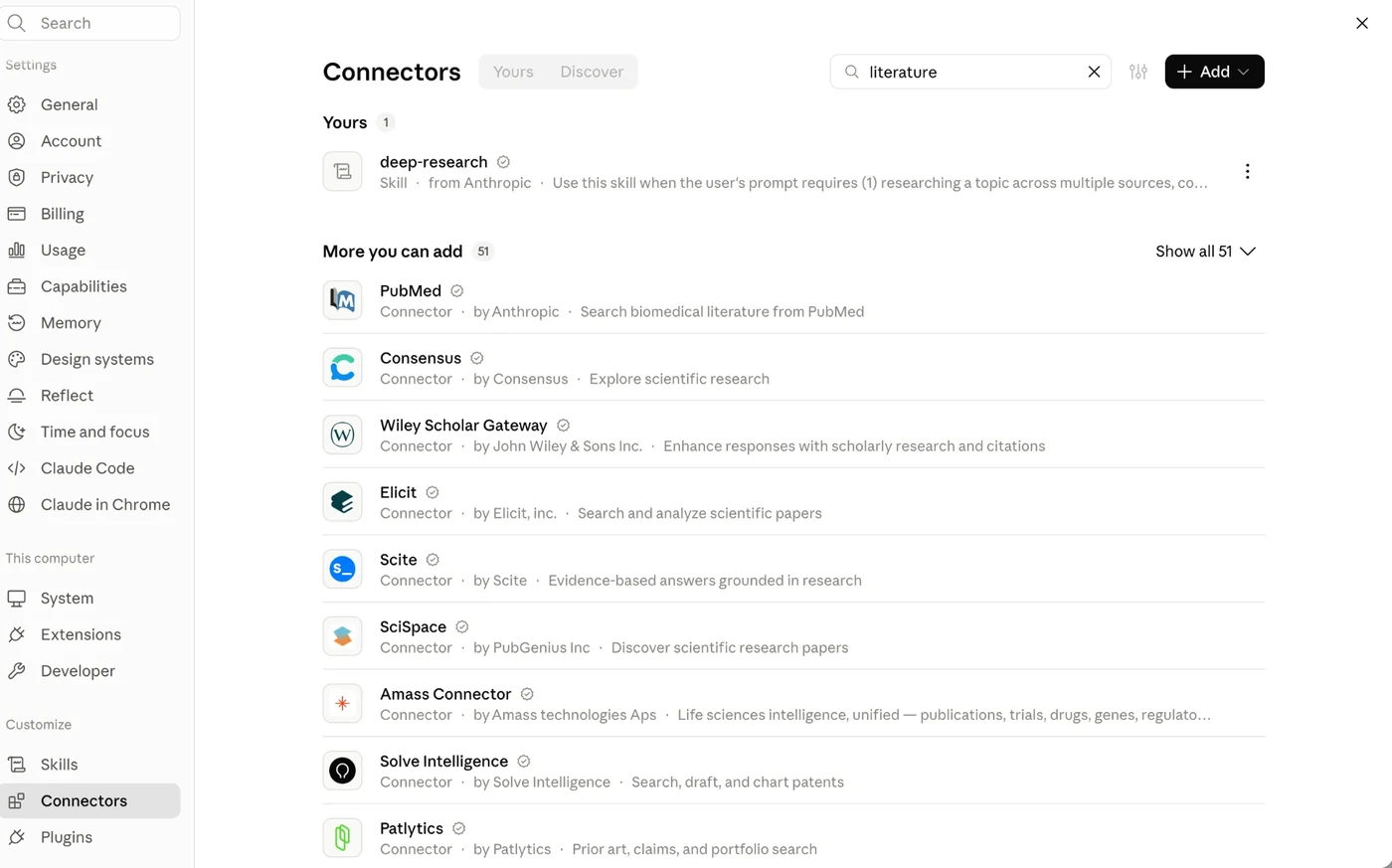
- In Claude, open Settings and choose Connectors.
- Search for a word such as
literature. - Choose a connector to read what it does, then click Connect to Claude. Some ask you to sign in to the service.
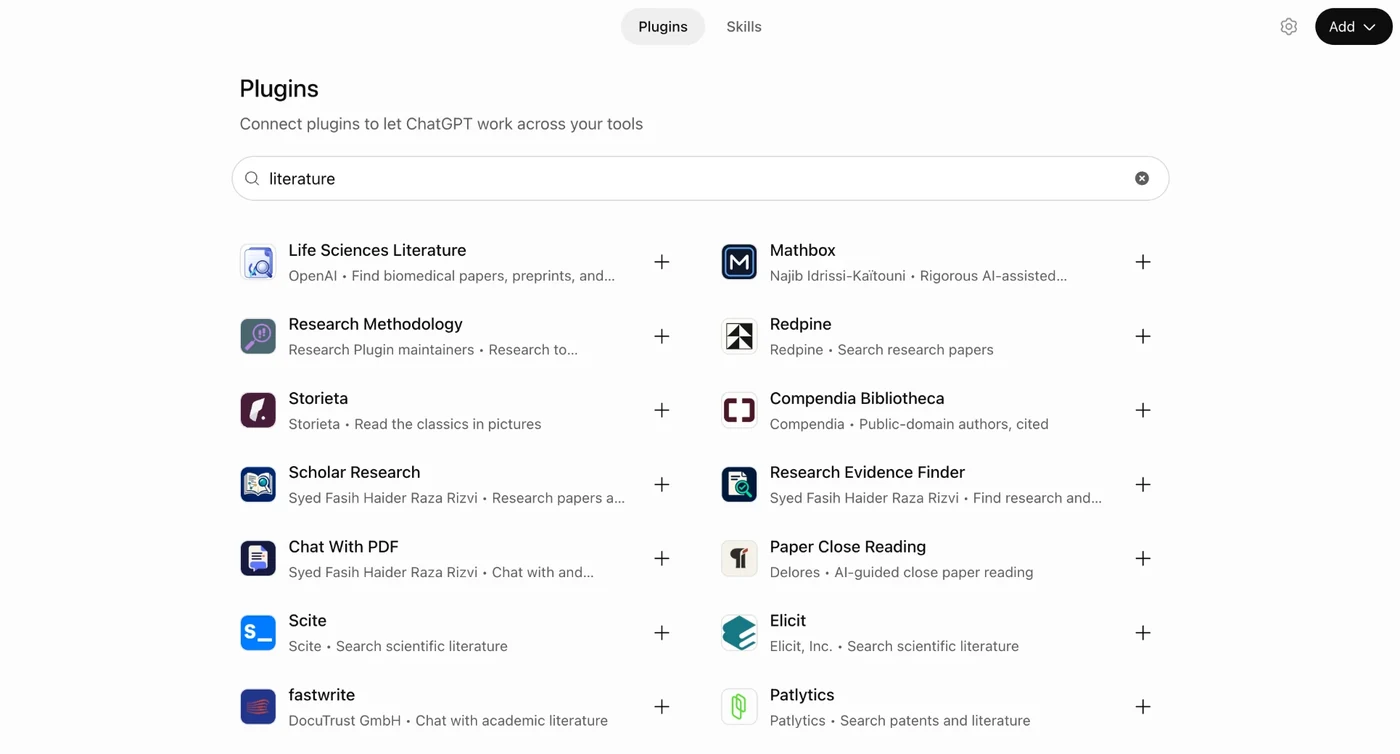
- In ChatGPT, open Plugins.
- Search for a word such as
literature. - Click + beside a plugin, or open it and click Install plugin. Then start a new chat to use it.
A few tools to know
| Tool | Found in (October 2026) | What it does |
|---|---|---|
| Consensus | Claude | Answers a research question from more than 400 million academic papers (drawn from Semantic Scholar, OpenAlex and PubMed), with a link to each paper. |
| Elicit | Claude, ChatGPT | Searches and analyses research papers. |
| Scite | Claude, ChatGPT | Searches the research literature and gives answers grounded in it. Also known for showing whether later papers support or contrast a finding. |
| SciSpace | Claude | Helps you discover research papers. |
| Wiley Scholar Gateway | Claude | Searches current research in Wiley's journals, which include many business journals, and answers with citations and DOI links. Wiley journals only. |
| PubMed / Life Sciences Literature | Claude / ChatGPT | Search biomedical and health research (PubMed; ChatGPT's also covers PubMed Central's open-access texts and the bioRxiv and medRxiv preprint servers). Useful for topics such as health management. |
These tools draw on sources such as Semantic Scholar, OpenAlex, PubMed or one publisher's journals, not on Scopus or Web of Science, so they find a different set of papers. The list of tools changes often; the screenshots show what was offered in October 2026.
4
Explore a Topic with Google Scholar Labs
Google introduced Scholar Labs on 18 November 2025 as "a new feature that explores how generative AI can transform the process of answering detailed scholarly research questions". It analyses your question to find its key topics, aspects and relationships, searches Google Scholar for all of them, and then picks the papers that answer your overall question, explaining how each one does. At first it was open to a limited number of signed-in users.
To try it, sign in with a Google account, open Google Scholar's menu (☰) and choose Labs (the menu is shown on the Citing page).
- Type a detailed research question, as a full sentence, in the Ask Scholar box. If you type only a topic, such as "AI transformation in business", Scholar Labs suggests fuller questions to explore, for example "How does executive leadership's commitment influence successful AI-driven business transformation?"
- It lists the papers it found, each with a short AI-written explanation of how it relates to your question, above the usual Google Scholar links (Save, Cite, Cited by).
- Use Ask a follow-up to refine the list, or New session to start again.
Check where each paper was published: Scholar Labs does not judge quality. In a test search for "AI transformation in business" (October 2026), the first result came from a journal that is not on the ABDC list, and the second from a journal rated C.
Scholar Labs can help you explore a new topic. But its explanations can be wrong, it may miss important work, and the same question can give different results on another day, so it cannot be the documented search for a review either. Always read the papers themselves (see Use AI Responsibly).
5
AI in EndNote: The Research Assistant
EndNote 2025 has its own AI tool, the Research Assistant, which works on the papers in your EndNote library (in the desktop app and EndNote online). With a paper's PDF attached to its reference, you can:
- Key Takeaway: see a short list of the paper's main points.
- Summarise a passage you have highlighted.
- Chat with the document: ask questions about the paper, such as "What are the results?"
- Translate the paper, or a section of it.
It can help you decide which papers to read closely and find your way around a long one. It does not replace reading them: check its answers against the paper itself. New to EndNote? Start with the three-minute introductions on the Citing page.
The videos come from YouTube. Nothing is loaded from YouTube until you press Play; YouTube (Google) then receives your visit, under its own privacy policy.
6
Check Every Reference
AI tools can suggest papers that do not exist, or mix up the details of real ones: a real DOI with an invented title, or the wrong authors or year. Check every reference an AI gives you before you use it.
- Crossref's Simple Text Query (free): paste in a list of references and it finds the DOI of each one it recognises. A reference it cannot match needs a closer look. See Checking References on the Citing page.
- Scholar Sidekick (free, no account): an add-on for both Claude and ChatGPT, and a website. From a DOI or other identifier, it checks that the title and authors you cite match the real record, which catches a real DOI paired with an invented title. It also checks whether a paper has been retracted or corrected (using Crossref and Retraction Watch), finds a free, legal copy if there is one (using Unpaywall), and formats the reference in APA, Harvard or thousands of other styles, or exports it for EndNote. In ChatGPT it can check a list of up to 25 references at once.
Both work best for journal articles with a DOI; check books, reports and other references without one by hand. A reference that checks out is real, but you still need to read it, to be sure it says what you cite it for.
7
Keep Up with New Papers: Alerts and Scheduled Searches
New papers keep appearing while you work. The most reliable way to hear about them is an alert from a database: save your search in Scopus or Web of Science, or use Create alert in Google Scholar (see the Citing page), and you get an email when new papers match.
AI assistants can also run a search for you on a schedule and report back:
- ChatGPT: ask in a chat, for example "Every Monday at 9 am, find papers published in the last week on remote work and innovation in management journals, and list them with links." ChatGPT sets this up as a scheduled task; you can see, change or pause it on the Scheduled page in the sidebar. Scheduled tasks need a paid ChatGPT plan.
- Claude: in the Claude Desktop app, Cowork can run a task on a schedule, such as daily or weekly, and let you know the result. It needs a paid Claude plan, and runs only while your computer is awake and the Claude app is open; a missed run happens when you next open it.
A scheduled AI search is a helpful extra, not a replacement for database alerts: it may miss papers, list papers that are not new, or describe them wrongly. Open each paper before you rely on it.
8
Use AI Responsibly
Rules on AI differ between universities, courses and supervisors, and they are changing quickly. Before you use AI in assessed work, a thesis or a paper:
- Check what is allowed in your course outline, or ask your supervisor.
- Say how you used it, if your university or the journal asks, and reference it in the style they require.
- Keep private things private. Your questions go to the AI company and to any service you connect, so do not paste in unpublished data, interview or survey responses, or anything confidential.
- Stay the author. Read every paper you cite, check every reference, and make sure each argument is your own.
Your university will have its own guidance; for example, see UNSW's guides to using AI in university and referencing AI.
The literature reviews guide covers academic integrity and accurate sources, and the Citing page shows how to check references and find DOIs.